susan.ai

Features

From first ring to paid and reviewed

Follow a job step by step — the call, the quote, the visit, the payment and the review — then see what Susan keeps running behind the scenes.

The job

Susan answers · 01 / 15

A customer calls. Susan picks up.

Day or night, Susan answers in your business name, takes the caller's name and mobile number and gets the gist of the problem — no voicemail, no missed job.

  • Answers 24/7, even while you're on a ladder
  • Collects name, mobile and what's wrong in plain words
  • Flags emergencies so they jump the queue
9:41
AI receptionist answering
Sarah Connor
(555) 201-7788
“Hi, thanks for calling Test Plumbing. What's going on?”
“Water's leaking under my kitchen sink!”
⚠ Urgent · kitchen leak
Text with a link · 02 / 15

Right after the call, Susan texts the customer a private link to their job chat — no app to download, no account to make.

  • Opens on any phone in one tap
  • Chat asks them to describe the problem and give the job address
  • Everything about the job stays in that one thread
9:41
Messages · Test Plumbing
Job #402 · Test Plumbing Co
“I'm texting you a link now so you can send photos of the issue.”
Hi Sarah! Tap here to open your job chat:
susan.ai/chat/402
Delivered · just now
Photos & video · 03 / 15

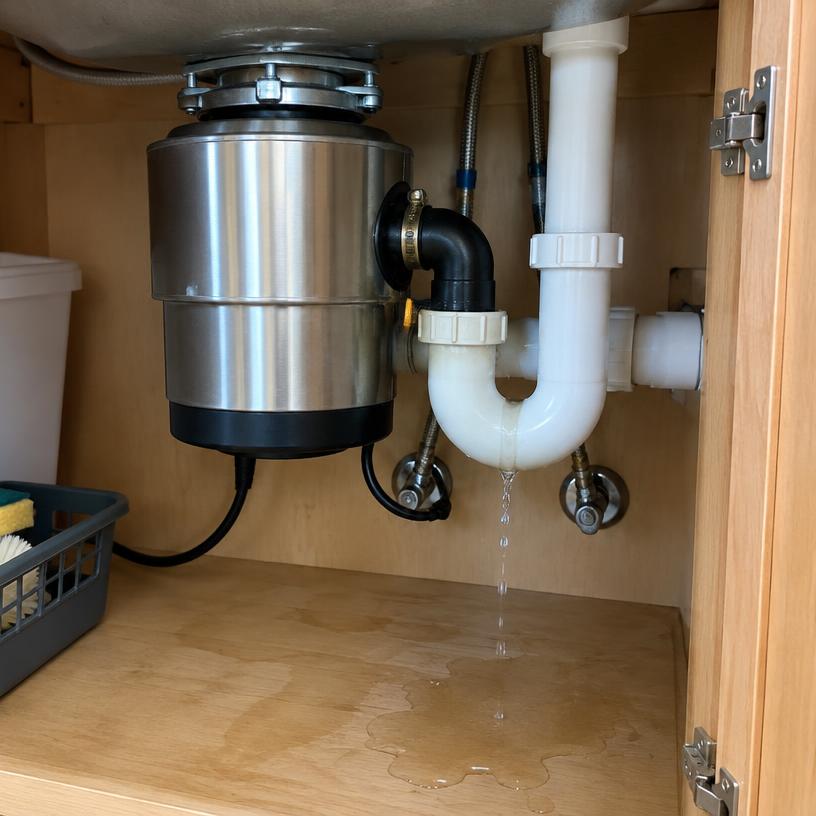
They show you the problem with photos and video

The customer drops pictures and short videos straight into the chat, so you can see the job before you ever drive out.

  • Photos and videos upload right from their camera
  • You get notified the moment they arrive
  • Size up the job from wherever you are
9:41
Sarah · Kitchen leak
Job #402 · Test Plumbing Co
Hi Sarah! Please add photos or a short video of the problem.
Leaking kitchen sink disposal
Customer photo of the plumbing issue
Here's the leak 👆
3 files uploaded
Send a quote · 04 / 15

You quote it from the photos — by voice

Say “quote Sarah $200 labor and $85 for a new disposal” and a clean itemized quote lands in the customer's chat seconds later.

  • Line items and totals build themselves from one sentence
  • Money math is exact, never guessed
  • Your licence and insurance show on every quote
9:41
Sarah · Kitchen leak
Job #402 · Test Plumbing Co
“Quote $350 new garbage disposal”
Quote #118
Labor$200.00
Garbage disposal$150.00
Total$350.00
Accept & sign
Or visit first · 05 / 15

Need to see it in person? Offer a visit instead

Some jobs can't be priced from photos. One tap tells the customer you'd like to look first and opens your calendar so they can pick a time.

  • No quote sent until you've seen the job
  • Customer books the visit from your free slots
  • After the visit, quote as normal in the same chat
9:41
Sarah · Kitchen leak
Job #402 · Test Plumbing Co
Thanks for the photos! I'd like to come and take a proper look before quoting — pick a time that suits you:
Book a visit
Tomorrow 8:00 – 10:00 AM
Tomorrow 10:00 AM – 12:00 PM
Thu 2:00 – 4:00 PM
✅ Visit booked — we'll confirm the price after we've seen it.
Accept & sign · 06 / 15

The customer accepts and signs on their phone

They read the breakdown and sign with a fingertip — no printer, no PDF, no “I'll sign it tonight”.

  • E-signature captured right in the chat
  • Time, IP and device recorded with every signature
  • You're notified the second it's signed
9:41
Sarah · Kitchen leak
Job #402 · Test Plumbing Co
Quote #118SIGNED
Labor$200.00
Garbage disposal$150.00
Total$350.00
Sarah Connor
Pick a window · 07 / 15

They pick a 2–4 hour window from your calendar

A calendar opens by day with only your genuinely free windows. The customer taps one and it lands on your schedule instantly.

  • Arrival windows customers can plan around
  • Synced with your internal calendar, so no double-booking
  • Shows up on your board straight away
9:41
Sarah · Kitchen leak
Job #402 · Test Plumbing Co
Pick a time
Tomorrow 8:00 – 10:00 AM
Tomorrow 10:00 AM – 12:00 PM
Tomorrow 2:00 – 4:00 PM
✅ Booked for tomorrow 10:00 AM – 12:00 PM.
Job done, invoice out · 08 / 15

Mark it done — the invoice sends itself

Tap the job complete and the approved quote turns into an invoice with a payment link, right in the customer's chat.

  • Nothing retyped — built from the signed quote
  • Pay link included in the invoice
  • Customer pays by card or Apple Pay
9:41
Sarah · Kitchen leak
Job #402 · Test Plumbing Co
Job complete — disposal installed and tested. 🛠
Invoice #119
Amount due$350.00
Pay · Card
Get paid · 09 / 15

Payment goes straight to you and the job flips to paid everywhere — the chat, your board and your numbers.

  • Money lands in your own account
  • Paid status updates automatically
  • No chasing at the door
9:41
Sarah · Kitchen leak
Job #402 · Test Plumbing Co
Invoice #119PAID
Amount due$350.00
✓ Paid with Apple Pay
Payment received — thank you, Sarah!
Review request · 10 / 15

Then Susan asks for a review

After payment, the customer gets a friendly text with links to leave you a review on Google or Yelp.

  • Sent automatically once the job is paid
  • Direct links to your Google and Yelp pages
  • More 5-star reviews, more calls
9:41
Messages · Test Plumbing
Job #402 · Test Plumbing Co
Thanks for choosing Test Plumbing! Mind leaving us a quick review?
Leave a Google review
Done! Super fast service ⭐️

Behind the scenes

CRM · 11 / 15

Meanwhile, your CRM keeps itself

Every caller becomes a customer record, and every job moves across your board on its own as it progresses.

  • Customers, addresses and job history in one place
  • Board shows new leads, quotes out, booked and done
  • Unread badges show who's waiting on you
9:41
Pipeline
New
Sarah · leak
Mike · heater
Quote
Ann · $350
Booked
Tom · Thu
$18,420
paid
$4,960
owed
68%
won
Reports · 12 / 15

Income vs. pending, by week and month

See what's been paid and what's still owed — this week, this month, any month — without touching a spreadsheet.

  • Paid income and pending payments side by side
  • Weekly and monthly totals
  • Every figure ties back to a real invoice
9:41
Reports
$18,420
paid this month
$4,960
still owed
68%
quotes won
12
jobs done
Paid vs pending
Updated the second a payment clears
Payment reminders · 13 / 15

Unpaid invoices chase themselves

If a job sits unpaid past the days you choose, a polite text with the pay link goes out — and stops once the money lands.

  • You set how many days before reminding
  • Each text carries the customer's pay link
  • Stops the second payment clears
9:41
Payment reminders
Hi Sarah, a friendly reminder that invoice #119 ($350) is still unpaid. You can settle it here: susan.ai/pay/119
Sent automatically · 7 days after the job
First reminderafter 7 days
Second reminderafter 14 days
Stops whenpayment clears
You never have to send the awkward text
Document vault · 14 / 15

Licence and insurance, always on hand

Your paperwork lives in one secure place and shows up where it earns trust — on every quote.

  • Stored once, shown on every quote
  • Customers can check you before you arrive
  • Expiry dates flagged ahead of time
9:41
Document vault
License #C-36
CA · expires 04/27
Insurance · $2M
Policy 88-4410
Warranty card
Job #402
Signed quote
Sarah Connor
Renewals flagged 30 days ahead

Getting started

Forward your number · 15 / 15

All you do is forward your existing number

Keep the number your customers already know. Forward missed or busy calls to Susan and she takes it from there.

  • No new number to hand out
  • Set it up in minutes from your phone
  • Answer yourself when you can — Susan catches the rest
9:41
AI receptionist answering
Sarah Connor
(555) 201-7788
“Hi, thanks for calling Test Plumbing. What's going on?”
“Water's leaking under my kitchen sink!”
⚠ Urgent · kitchen leak

How it works

From first ring to 5-star review

One step at a time. Watch the phone as the job moves through it.

The whole job, start to finish

Nine steps. Two taps from you.

Everything below runs itself once a call comes in. You only speak the price and tap when the job is done.

Homeowner

  • Taps the link from the text — no app, no account, no password
  • Drops in photos or video of the problem
  • Reads the itemised quote, signs with a fingertip, picks a 2-hour window
  • Pays from the same chat, then leaves the review

Susan

  • Answers in two rings, nights and weekends included
  • Asks for name, the fault and whether it's an emergency
  • Opens a private job chat and sends the link the second the call ends
  • Turns your spoken price into a quote and does every total on the server
  • Chases the signature, the booking, the invoice and the review

You

  • Say the price out loud: “quote Sarah $200 labour and $85 for a new disposal”
  • Tap Mark job complete when the work is done
  • Nothing else — the invoice, payment link and review request follow themselves

Stop chasing. Start finishing.

Start free